

If you have been putting off using AI in HR because you were not sure where to start, or because everything you have seen feels built for enterprise teams with a comms department behind them, this is the on-ramp I wish someone had handed me.
I am familiar with the experience of being on a lean HR team with no dedicated communications partner, no budget line item for a comms platform. What I have is Claude, about an hour of setup, and a system that now drafts my employee newsletters in my own voice, every single month, without me starting from a blank page.
Employee communications is one of those things I want to do well and consistently, but on a smaller HR team without a dedicated communications partner, the work often gets squeezed into the corners of the calendar, or into a Sunday afternoon I had planned to spend somewhere else.
The drift is rarely intentional, and it usually starts with the best of motives. We tell ourselves we will send the benefits update once we have time to write it well, or that we will wait until we have a real newsletter to put it in. The intent is to deliver something thoughtful. The result, more often than not, is that the message does not go out at all.
What I have come back to, again and again, is that the perfect newsletter is not what people actually need. They need to know what is happening with their benefits before the deadline arrives. They need to know what to expect during the performance review cycle. They need to know where to find the answer the third time they go looking for it. Sometimes the communication is just repeating something you already told them, on a different day, in a slightly different way, so it is front and center when they actually need it.
So I built an employee communications assistant in Claude Cowork... not for the impressive newsletter (although it’s becoming more impressive with each iteration), but for the small, consistent comms that serve people when I do not have three uninterrupted hours to spare. It helps me draft in my own voice, hold to a regular cadence, and send the message that needs to go out today. And if you have been AI-curious but stuck on where a solo HR person even begins, this is one real, specific place to start.
The system, at a glance
The build has seven steps, and I am sharing all of them in the full walkthrough... the exact prompts I used, the decisions I worked through, and what to expect at each stage. Here is the shape of it.
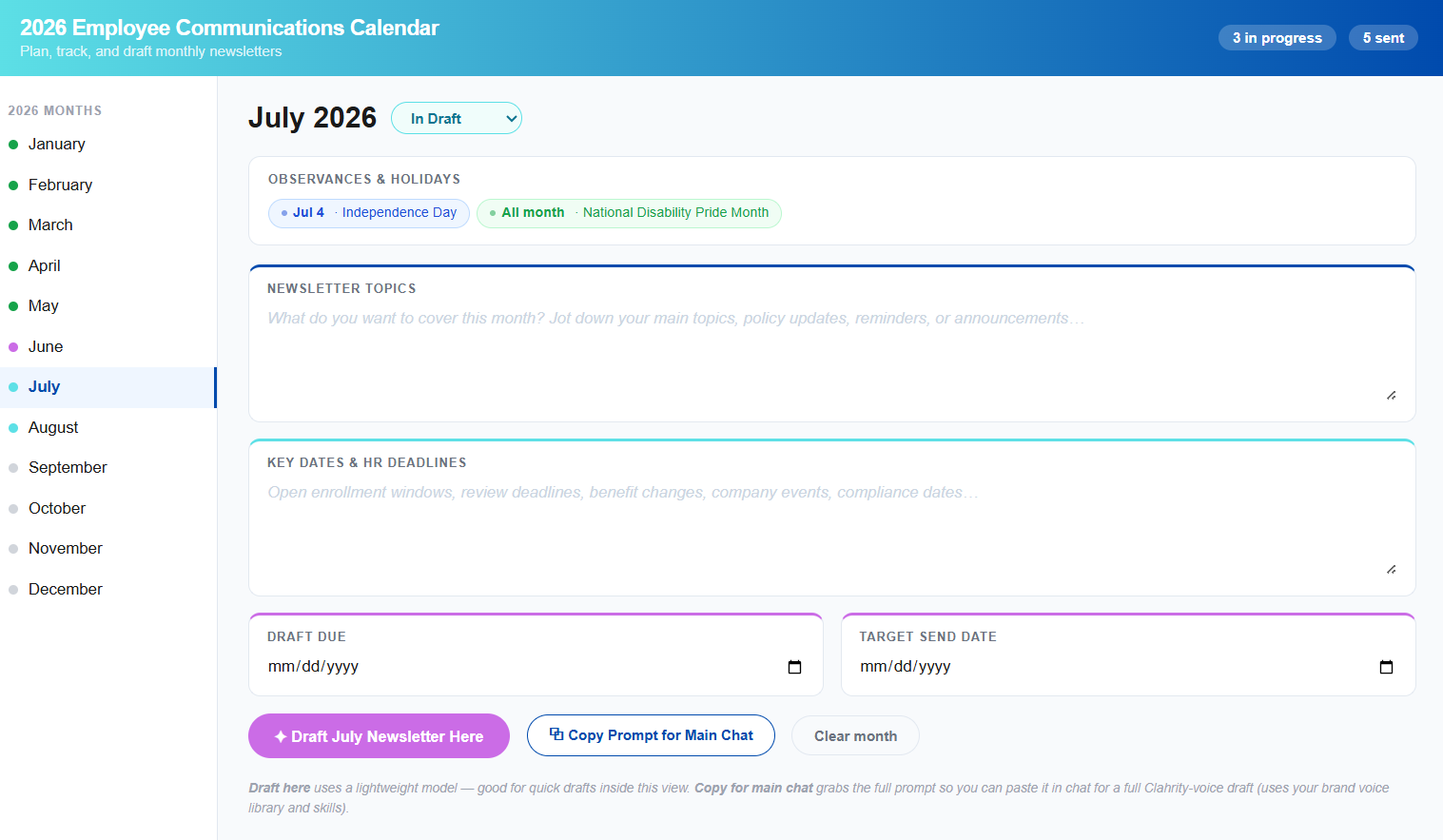
I started by capturing my own voice, in detail, through a long interview with Claude that became a reusable profile. From there, I turned that voice into a skill, so Claude applies it automatically any time I ask for an employee communication, without me re-explaining myself every time. Then I built the piece that keeps the whole year organized... an interactive communications calendar with every month pre-loaded, key observances included, and a place to track each newsletter from not-started to sent.
Each month, I fill in that calendar like a whiteboard: the topics I want to cover, the key HR dates, a draft due date, and a send date. When it is time to write, one click drafts the newsletter in my voice, using everything I have already told the system. From there, I ask Claude to format it for wherever it is going... Outlook, Slack, an intranet post, a different language... and I spend about ten minutes making the whole thing mine, from the color palette to the fields my team actually uses.
Get the full build
I am giving away two things to go along with this piece... the complete step-by-step walkthrough, with every prompt I used and the decisions behind them, and the 2026 Human Connection Calendar I built as the starting point for the observances piece, with federal holidays, cultural observance, and awareness months already mapped to a month.

If you are on a small HR team carrying communications alongside everything else, this is for you. And if you want to walk through building your own version, or you get stuck somewhere in the setup, email me at cristal@getclahrity.com. I would love to help.
With gratitude,
Cristal
Founder, Clahrity | getclahrity.com